
AI Ready: practical AI for everyone
Six hands-on weeks. Today’s AI tools. No coding. Finish with a portfolio that proves you are AI savvy.
- $0to learn
- 6weeks
- ~30hours
- 9modules + capstone
- 50+tools and platforms
- $5certificate + 1-year membership
You will get hands-on with
- ChatGPT
- Claude
- Gemini
- Microsoft Copilot
- Meta AI
- Perplexity
- NotebookLM
- Deep Research
- Google Scholar
- Consensus
- Gamma
- Canva
- Napkin AI
- Google Docs
- Microsoft 365
- ChatGPT data analysis
- Gemini in Sheets
- Claude analysis
- Copilot in Excel
- Canva Magic Studio
- Adobe Firefly
- Google Veo
- ElevenLabs
- Sarvam AI
- Bhashini
- n8n
- Zapier
- Make
- Lovable
- Bolt
- Replit
- Google AI Studio
- v0
- ChatGPT agent
- Claude connectors
- Model Context Protocol
- Hugging Face
- Ollama
- LM Studio
- Llama
- Gemma
- Qwen
- Mistral
- Teachable Machine
- TensorFlow Playground
- Tokenizer playground
- Gandalf prompt-injection game
- Deepfake quizzes
- Google Colab
- Python
- Gemini API
- OpenAI API
- Claude API
- Gradio
- Hugging Face Spaces
Built for anyone who wants to use AI well
No coding, no maths, no paid tools. Just a laptop or phone and curiosity.
University students
Any stream, any yearStudy smarter and graduate with AI skills employers now expect.
Working professionals
Any role, any industrySave hours every week on research, reports, data and email.
Educators and faculty
Schools and universitiesPlan, teach and assess with AI, and set fair rules for students.
Job seekers and career switchers
Starting or changing directionShow a portfolio of real AI work, not just a certificate.
Founders and small businesses
Teams of one to fiftyAutomate routine work and build simple tools without hiring.
Curious lifelong learners
No background neededUnderstand the technology changing work, news and daily life.
Want deep maths and model training? Start with AI Ready, then take the optional Builder track.
What you will be able to do
Eight skills, practised every week, proved by your own work.
Choose the right tool
Pick the best assistant for each job, and know when not to use AI.
Prompt like a pro
Give AI the context it needs and get useful answers the first time.
Research and verify
Run deep research, check every source and spot made-up citations.
Analyse data
Turn a spreadsheet into charts, insights and a slide deck in minutes.
Automate work
Connect apps so a repeated task runs itself, without code.
Build an app
Describe an app in plain words, build it with AI and publish it.
Direct AI agents
Hand an agent a multi-step task, supervise it and catch its mistakes.
Use AI responsibly
Protect privacy, avoid bias, spot deepfakes and disclose AI use.
10 pieces of real work you can show
Every module adds one. Share them with employers, or submit them for the WAC certificate.
- AI tool scorecard
- How-AI-works explainer
- Prompt library + custom assistant
- Verified research brief
- Data-insight deck + video
- Live app + automation
- Agent run log
- AI-use policy
- Role AI playbook
- Capstone demo
Plenty of free AI courses. Few make you AI savvy.
Concept courses explain AI but rarely let you use it. Builder courses are practical but start with Python. The practical no-code options teach one company’s product. AI Ready fills the space in between.
- AI Ready (WAC)
- OpenAI Academy
- Anthropic AI Fluency
Until now: single-vendor only
- Microsoft GenAI for Beginners
- Hugging Face
- fast.ai
- CS50 AI
- Kaggle Learn
- Elements of AI
- Google AI Essentials
- AI for Everyone
- YUVA AI for ALL
- Elements of AI: Building AI
Six gaps we designed around
- One tool, one vendorCompany academies teach their own assistant. We use many.
- Theory, no practiceLiteracy courses end in a quiz. Ours end in something built.
- The code wallAgents and automation were for coders. Not any more.
- Courses age fastOur frontier module is refreshed every quarter.
- Attendance certificatesWe assess real work, not completion.
- Tools without judgementChecking AI output is practised in every module.
From first prompt to your own AI project
About 5 hours a week. Every module follows the same four steps, and about 70% of the time is hands-on.
- 1Week 1
- 2Week 2
- 3Week 3
- 4Week 4
- 5Week 5
- 6Week 6
- Watch15–20 min video
- Try45–90 min guided lab
- Shipone piece of real work
- Checkquiz and peer feedback
Nine modules and a capstone, in detail
Pick a module to see what you learn, the lab you do, the tools you use and what you ship.
Kick-off and setup
Get set up safely and find out where you are starting from.
You will learn
- What AI is, and is not, in 2026
- The landscape: assistants, agents, open models
- Setting up free accounts safely
- Privacy: what never to paste into an AI tool
- Your baseline skills check
Hands-on lab
- Give three assistants the same five tasks: summarise, explain, plan, calculate, create
- Score each answer for accuracy, usefulness and speed
- Note where each one shines and where it fails
Tools you will use
- ChatGPT
- Claude
- Gemini
- Microsoft Copilot
You ship: Your baseline score and an AI tool scorecard
How AI actually works
Understand what happens inside AI, so you can predict when it will fail.
You will learn
- Rules vs. learning: what machine learning is
- Data, models and predictions
- Neural networks, intuitively
- How large language models predict the next token
- Context windows, memory and reasoning models
- Why AI hallucinates, and how to reduce it
Hands-on lab
- Train a three-class image classifier in your browser, then break it with biased data
- Count the tokens in a paragraph in English and in Hindi
- Make a model hallucinate, then fix it by grounding it in a source
Tools you will use
- Teachable Machine
- TensorFlow Playground
- Tokenizer playground
- 3Blue1Brown
- Karpathy talks
You ship: A one-page explainer: “How an AI answered my question”
Prompting and context engineering
Get reliable, useful answers by giving AI the right instructions and context.
You will learn
- Anatomy of a strong prompt: role, task, context, format
- Examples and reusable templates
- Asking AI to reason, critique and improve
- Context engineering: files, projects and memory
- Custom assistants you can reuse
- The four-check habit for verifying output
Hands-on lab
- Rewrite five weak prompts and compare the before and after
- Build a custom assistant for a task you do every week
- Test it on three real cases and refine its instructions
Tools you will use
- Custom GPTs
- Claude Projects
- Gemini Gems
You ship: A 10-prompt library and a working custom assistant
Research and learning with AI
Research faster without being fooled, and use AI as a personal tutor.
You will learn
- AI search vs. chat: when to use which
- Deep research agents
- Studying from your own sources, with audio overviews
- Checking citations and spotting fabricated sources
- AI as a tutor: quizzes, flashcards, Socratic mode
- Academic integrity: what is allowed and how to disclose it
Hands-on lab
- Pick a question from your field and run a deep research report
- Open and verify every citation it gives
- Load the verified sources into NotebookLM and generate a study guide
Tools you will use
- Perplexity
- NotebookLM
- Deep Research
- Google Scholar
- Consensus
You ship: A two-page brief with verified sources, plus a study guide
AI for everyday work
Produce documents, data insights, slides, images and video in a fraction of the time.
You will learn
- Writing and editing in your own voice
- Data analysis: upload a sheet, ask questions, chart it
- Slides and documents in minutes
- Generating and editing images
- Short videos and voice-overs
- Translation, including Indian languages
- Meeting notes and email
Hands-on lab
- Analyse a real public dataset and find three insights
- Turn them into a five-slide deck with AI visuals
- Make a 60-second narrated video, then translate it into a second language
Tools you will use
- ChatGPT data analysis
- Gemini in Sheets
- Gamma
- Canva
- Napkin AI
- ElevenLabs
- Sarvam AI
- Bhashini
You ship: A data-insight deck and a short narrated video
Build without code
Automate a repeated task and publish your first app, without writing code.
You will learn
- Thinking in workflows: trigger, steps, output
- Adding AI steps to automations
- Vibe coding: describe an app and AI builds it
- Fixing bugs and making changes by conversation
- Publishing and sharing your app
- Keeping data and API keys safe
Hands-on lab
- Automate one task: a form reply is summarised by AI and filed in a sheet
- Build a quiz, calculator or portfolio site by describing it
- Publish it and share the link with three people for feedback
Tools you will use
- n8n
- Zapier
- Make
- Lovable
- Bolt
- Replit
- Google AI Studio
You ship: A live app link and a working automation
AI agents and the frontier
Understand and direct the agents that now act on your behalf.
You will learn
- Chatbots vs. agents: tools, plans and actions
- Browser and computer-use agents
- MCP: how AI connects to your apps
- Coding agents for non-coders
- Voice and multimodal AI
- Open and on-device models
- Where agents fail, and how to supervise them
Hands-on lab
- Give an agent a multi-step task, such as comparing five universities’ AI policies in a table
- Log every step, error and correction it makes
- Run a small open model on your own laptop and compare it with a frontier model
Tools you will use
- ChatGPT agent
- Claude connectors
- Gemini
- Model Context Protocol
- Ollama
- LM Studio
- Hugging Face
You ship: An agent run log with your review
Responsible and safe AI
Use AI in ways that are fair, legal, safe and honest.
You will learn
- Bias and fairness
- Privacy and data protection: India’s DPDP Act, GDPR and the EU AI Act
- Deepfakes, voice clones and scams
- Copyright and who owns AI output
- The environmental cost of AI
- Disclosure and AI-use policies
Hands-on lab
- Red-team a chatbot: try to make it break its own rules
- Take a deepfake-spotting challenge and explain the clues
- Write an AI-use policy for your class, team or business
Tools you will use
- Gandalf prompt-injection game
- Deepfake spotting quizzes
- Policy templates
You ship: An AI-use policy and a red-team report
AI in your field and career
Map AI onto your own field and show employers what you can do.
You will learn
- AI across fields: business, education, health, engineering, law, creative work, public service
- Mapping tasks: automate, augment or keep human
- Skills employers are asking for
- AI-assisted job search: resume, portfolio, mock interviews
- Building a habit of keeping up
Hands-on lab
- Map ten tasks in your target role to the right AI tool, or to “no AI”
- Build an AI-assisted resume and add your app as a portfolio site
- Practise a voice mock interview and review the feedback
Tools you will use
- ChatGPT
- Claude
- Gemini
- Canva
- Voice mode
You ship: Your role AI playbook and portfolio
Capstone: solve a real problem
Bring everything together on a real problem for real people.
You will learn
- Pick a problem for a club, department, family business or employer
- Plan it: users, tools, success measure
- Build it with AI
- Test it with real users
- Present it in a three-minute demo
Hands-on lab
- Write a one-page plan and get peer feedback
- Build and test with at least three users
- Record a three-minute demo and a short reflection
Tools you will use
- Any tools from the course
You ship: A 3-minute demo video and reflection, scored for Distinction
Builder track: code a little, build a lot
- Google Colab and Python basics
- Call an AI model from code
- A chatbot that answers from your own PDFs (RAG)
- An agent with tools
- Publish it on Hugging Face Spaces

The AI toolkit you will actually use
50+ tools across 12 categories, chosen for what learners and employers use today.
AI assistants
- ChatGPT
- Claude
- Gemini
- Microsoft Copilot
- Meta AI
Research and study
- Perplexity
- NotebookLM
- Deep Research
- Google Scholar
- Consensus
Documents and slides
- Gamma
- Canva
- Napkin AI
- Google Docs
- Microsoft 365
Data analysis
- ChatGPT data analysis
- Gemini in Sheets
- Claude analysis
- Copilot in Excel
Image, video and voice
- Canva Magic Studio
- Adobe Firefly
- Google Veo
- ElevenLabs
- Sarvam AI
- Bhashini
No-code automation
- n8n
- Zapier
- Make
AI app builders
- Lovable
- Bolt
- Replit
- Google AI Studio
- v0
Agents and connectors
- ChatGPT agent
- Claude connectors
- Model Context Protocol
- Gemini
Open and local models
- Hugging Face
- Ollama
- LM Studio
- Llama
- Gemma
- Qwen
- Mistral
How AI works labs
- Teachable Machine
- TensorFlow Playground
- Tokenizer playground
Safety labs
- Gandalf prompt-injection game
- Deepfake quizzes
Builder track
- Google Colab
- Python
- Gemini API
- OpenAI API
- Claude API
- Gradio
- Hugging Face Spaces
Free tiers or free alternatives for every lab. Tool names belong to their owners; WAC is not affiliated with them. The list is reviewed every quarter as tools change.
Module 5: build and publish your first app in an hour
This is what “hands-on” means at WAC. No code, just clear instructions and good judgement.
- 1Describe the app you want in plain words
- 2Watch AI build it, then ask for changes
- 3Test it, fix it, publish it, share the link
Which gas contributes most to global warming?
- Oxygen
- Carbon dioxide
- Nitrogen
Learning is free. For $5, get certified and a year of WAC membership.
Like edX: take the whole course free. Pay only if you want WAC to verify your skills, and the fee includes 12 months of WAC membership.
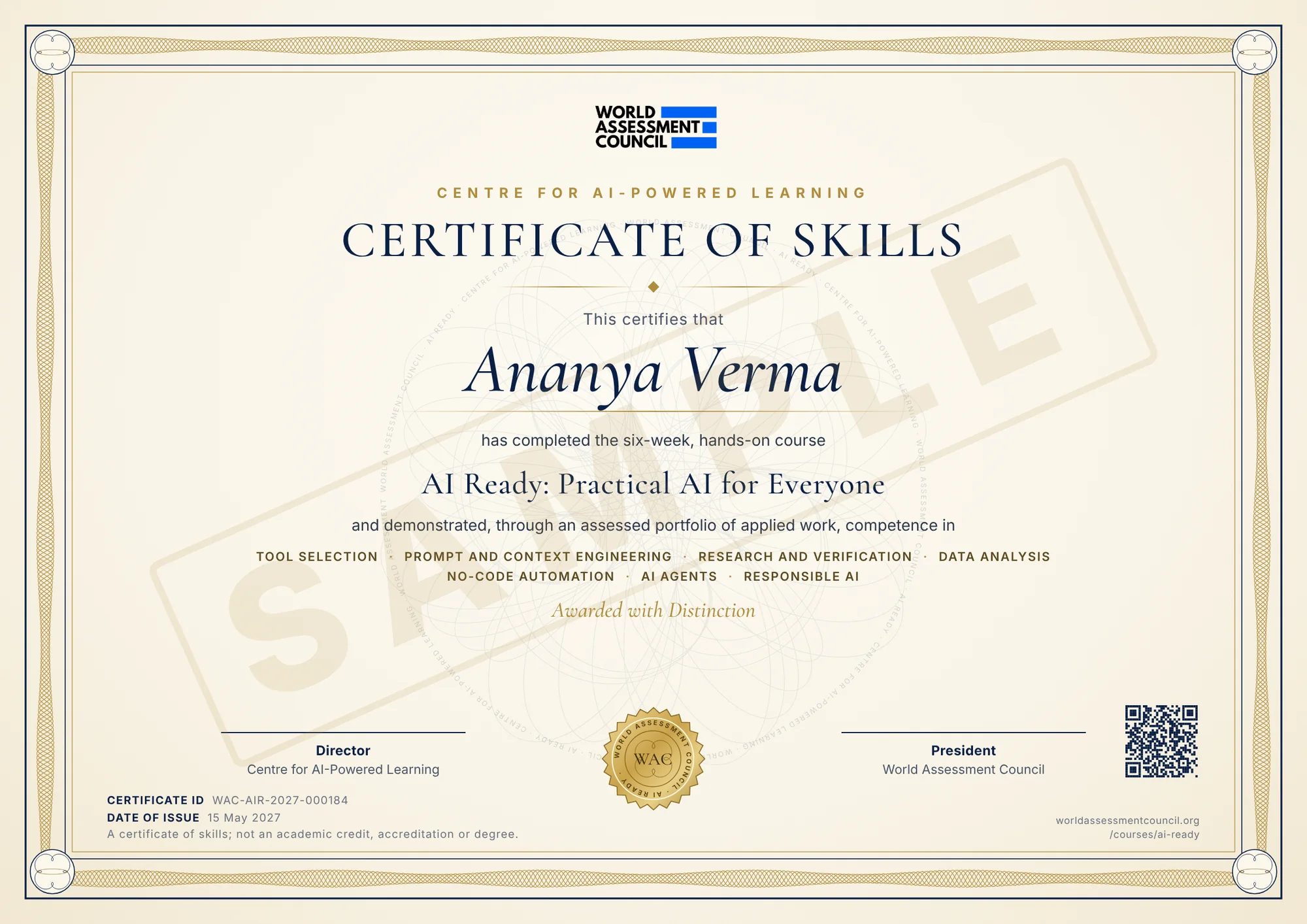 View full size
- Security designGuilloche border, watermark rosette and microtext, like a banknote
- Unique certificate IDAnd a QR code on every certificate
- Skills, not attendanceLists the seven competences assessed in your portfolio
- DistinctionPrinted when your capstone and live task excel
- Print or shareA4 PDF to print, image to post on LinkedIn
$0
- All modules, videos and labs
- Weekly live labs and community
- Peer feedback on your work
- Free AI Aware badge
$5USD, once per course
- Everything in the free track
- Portfolio assessed on the WAC rubric
- Verifiable WAC certificate and skills transcript
- Distinction and Builder endorsements
- AI AwareModules 0–2 doneFree badge
- AI ReadyAll modules + 8-piece portfolioCertificate + 1-year membership
- DistinctionTop capstone + 45-minute live taskOn your certificate
- AI BuilderBuilder track + a published AI projectEndorsement
A certificate of skills, not an accreditation or a degree. Every piece of work is scored on tool choice, prompt and context quality, verification and responsible use. The certificate shown is a sample.

Make every student and employee AI ready
- A dedicated cohort for your students or staff
- Live labs with WAC faculty
- Progress dashboards and WAC certification
- A capstone showcase for your best learners
Join the first AI Ready cohort
Register free. We will email you when the first cohort opens.
- Free course. Decide later about the USD 5 certificate, which includes a year of WAC membership.
- No coding and no paid AI accounts needed.
- Your details are used only for this course. See the Privacy Policy.
Questions? Write to connect@worldassessmentcouncil.org.
You are registered for AI Ready.
WAC will email you when the first cohort opens. If you asked about a university or team cohort, we reply by email.
See WAC MasterclassesQuestions and answers
Is AI Ready really free?
Yes. Every module, video, lab and live session is free. The only optional charge is USD 5 for the WAC certificate, the same model edX uses.
What do I get for USD 5?
A verifiable WAC Certificate of Skills, assessed on your portfolio, plus one year of WAC membership at no extra cost: Student membership if you are a student, Individual membership otherwise. Membership gives you member pricing and priority places on WAC masterclasses and courses, and WAC member resources.
Do I need to know coding or maths?
No. The core course needs no coding and no maths. The optional Builder track adds a little Python for those who want it.
Do I need to pay for AI tools?
No. Every lab works on free tiers, and each lab offers two tool options in case one is unavailable in your country or has reached its free limit.
Which tools will I use?
Leading assistants such as ChatGPT, Claude and Gemini, plus research, data, design, automation, app-building and agent tools. The tool list is reviewed every quarter as tools change.
How much time does it take?
About 5 hours a week for six weeks, roughly 30 hours in total. It is self-paced, so you can go faster or slower.
When does it start?
The date of the first cohort will be announced soon. Register on this page and WAC will email you when it opens.
How is the certificate awarded?
Your portfolio is assessed against the WAC rubric: tool choice, prompt and context quality, verification and responsible use. Distinction requires a strong capstone and a timed live task. It is a certificate of skills, not an accreditation or a degree.
Can my university offer it to all students?
Yes. Choose “Bring AI Ready to my university or team” in the form and tell us about your institution. WAC sets up a dedicated cohort.